
This discover cars app review examines whether the mobile app is a practical choice for finding, booking, and managing rental cars while traveling. Based on Discover Cars’ official website, official App Store and Google Play listings, and public review signals, it appears to be a useful companion for travelers who value mobile access to booking details, rental policies, vouchers, and support.
Affiliate disclosure: DriveTheAtlas may earn a commission if you book through affiliate links in this article, at no extra cost to you. This does not affect our assessment. Always compare the total price and read the rental conditions, supplier rules, and cancellation terms before booking.
Free cancellation on most bookings · No hidden fees
Quick Verdict: Is The Discover Cars App Good In 2026?
The short answer is yes—with sensible expectations. The Discover Cars app looks well suited to travelers who want to search rental offers, compare filters, keep their voucher available, and handle booking changes without needing a laptop.
This is not a rental car company operating its own fleet. It is a booking platform that compares offers from rental suppliers, so your actual pickup experience still depends heavily on the specific rental company and location you choose.
Who The App Is Best For
The app is most useful for travelers who are already comfortable comparing rental terms and want reservation information in their pocket. It is particularly practical for airport trips, international rentals, and itineraries where plans may change before pickup.
The official listing says users can manage bookings through the My Booking area, including changing dates, adding another driver, and upgrading the car. That makes the app more than a search tool; it can also be a useful trip-management hub.
Who May Want To Use The Website Instead
Some travelers may prefer the full website when booking a complex rental, comparing many suppliers, or reading lengthy terms on a larger screen. Desktop browsing can feel more comfortable when you are checking coverage exclusions, deposit rules, cross-border restrictions, or supplier-specific conditions.
Still, using the website to compare options and the app for access during the trip can be a sensible combination. The discover cars app review takeaway is that mobile convenience is its clearest benefit, not necessarily replacing every part of the desktop research process.
Bottom-Line Summary Of Strengths And Trade-Offs: Discover Cars App Review
The app’s strengths are clear: mobile booking access, policy visibility, useful filters, voucher availability, cancellation information, and customer support access. Its main trade-off is the same one found with any rental comparison platform: the supplier delivering the car ultimately affects pickup quality, vehicle availability, deposits, and on-the-ground service.
For travelers who read the details before committing, the app appears worth downloading before a rental trip.
What Discover Cars Does And How The App Fits Into The Booking Process
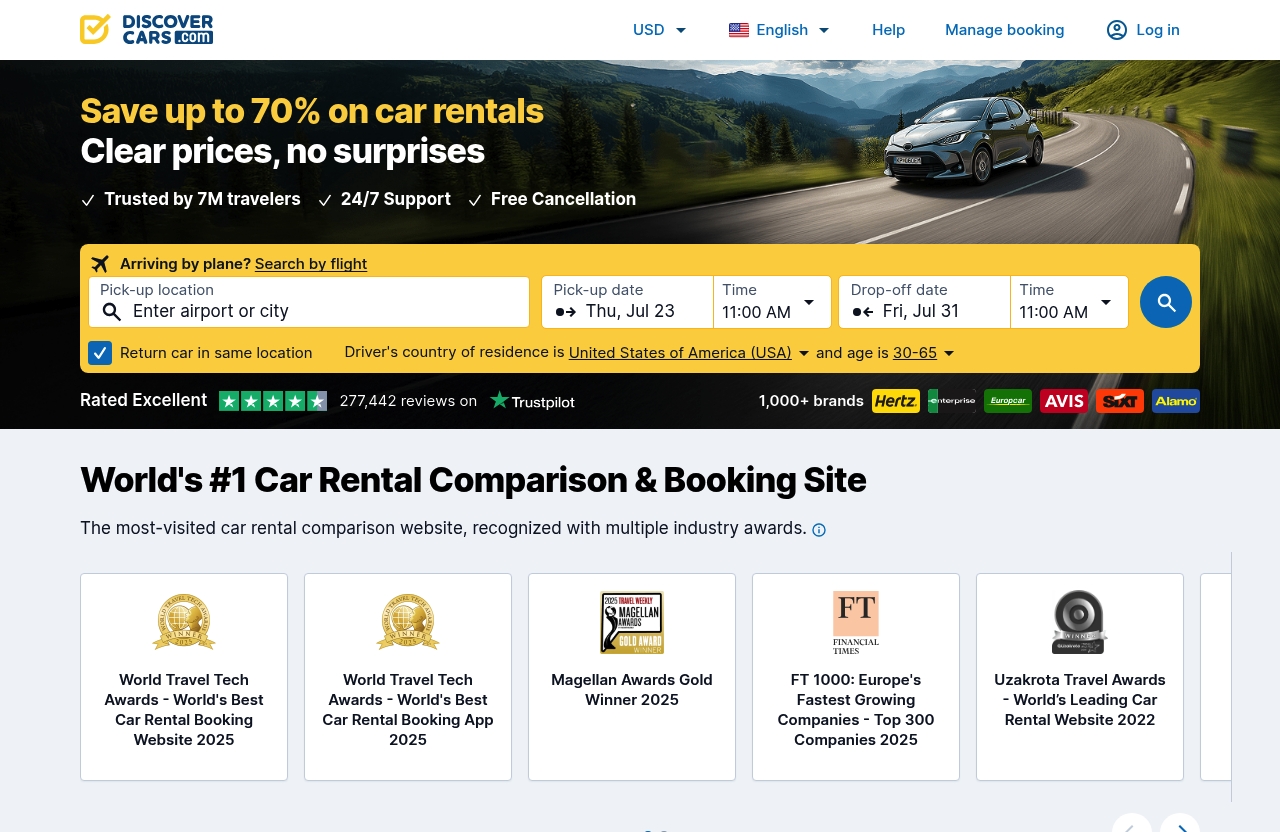
Discover Cars is a rental car comparison and booking platform. It brings together offers from rental suppliers, allowing travelers to search by pickup location, dates, driver residence, and other trip details.
According to the official homepage, the booking flow can include searching by flight number, choosing a pickup point, selecting whether to return the car to the same location, and entering pickup and drop-off times. The site also highlights clear prices, free cancellation, 24/7 support, and potential savings of up to 70% on car rentals.
How Discover Cars Compares Car Rental Prices
A search can return rental options from different suppliers, with the ability to compare vehicle types and rental conditions. The important point is that travelers should not choose solely based on the lowest headline price.
Before booking, review the mileage policy, fuel rule, included coverage, cancellation terms, pickup location, and supplier rating. A low daily rate may still be less suitable if the included mileage is limited or the rental desk is far from the terminal.
If you are deciding whether a comparison site or a supplier’s website is better for your trip, see our guide to [Discovercars vs Direct Booking: Which Car Rental Method Is Better in 2026?](/discovercars-vs-direct-booking-which-car-rental-method-is-better-2026/).
Where The App Helps Before And After Booking
Before booking, the app can help you search inventory and narrow the results with filters. The official App Store listing mentions filters for 4×4 vehicles, disinfected vehicles, and in-terminal rental desks.
After booking, the app’s role becomes more valuable. You can review the reservation, check relevant policies, access the discover cars app voucher, see cancellation information, and use My Booking to manage eligible changes.
That makes the discover cars app review case strongest for travelers who do not want to hunt through email while standing at an airport counter or trying to confirm a pickup time on the road.
Affiliate Disclosure And How This Review Is Tested
This review is based on official Discover Cars homepage information, official App Store and Google Play descriptions, and publicly visible Trustpilot signals. It does not claim personal use of the app or guarantee the outcome of any individual rental.
If the app’s booking-management features match your travel needs, you can compare rental offers through Discover Cars. Check the final conditions for the specific car and supplier before you pay.
Discover Cars App Features: What You Can Actually Do
The most useful part of this discover cars app review is separating confirmed functions from assumptions. The official app listings describe several practical tools that matter before pickup and while traveling.
Search And Filter Rental Cars
The app supports rental-car searching, while the broader Discover Cars booking flow allows travelers to enter pickup and return details, dates, times, and driver residence. Searching by flight can also be useful for airport travelers who want to align rental timing with an arrival.
The confirmed discover cars app filters include options such as 4×4 vehicles, disinfected vehicles, and an in-terminal rental desk. These may help travelers narrow a large results list based on practical needs rather than vehicle price alone.
For example, a winter road trip may make a 4×4 filter relevant, while an overnight airport arrival may make an in-terminal desk more important than saving a small amount on a shuttle-based pickup.
Manage Bookings In The My Booking Area
The official App Store listing says the My Booking section lets users manage a reservation. Available actions include changing dates, adding another driver, and upgrading the car.
This discover cars app booking management functionality is especially helpful when plans change before your trip. However, travelers should still check whether a requested change affects the rental rate, supplier availability, or cancellation eligibility.
The app also allows users to view booking details and see the flexible cancellation policy connected to their reservation. That is useful because cancellation rules can differ by offer, even when a platform promotes free cancellation more broadly.
Access Rental Details, Policies, And Vouchers
The App Store listing states that users can see the fuel policy, mileage policy, and included coverage information. These details deserve careful attention because they can materially affect the real cost and convenience of a rental.
A full-to-full fuel policy, for example, is generally easier to understand than a supplier policy that requires prepaid fuel. Likewise, unlimited mileage may be important for a multi-city drive, while a daily mileage cap may be fine for a short local trip.
The app also provides access to booking information and vouchers. Keeping the discover cars app voucher available on your phone can be helpful at pickup, but it is wise to save a copy offline or in your email as a backup before traveling.
Cancel Bookings From The App
The official listing says users can cancel with a click in the app and see when to cancel for a refund. It also states that free cancellation is available up to 48 hours before the scheduled pickup time.
That is a useful feature, but the phrase “up to 48 hours” matters. Check the cancellation deadline shown for your exact booking, and do not assume every reservation has identical terms.
A careful discover cars app cancellation routine is simple: open the booking early, confirm the deadline, verify the refund terms, and retain confirmation that the cancellation was submitted. If your plans are uncertain, do this before the stated cut-off rather than waiting until travel day.
Customer Support Inside The App
Discover Cars’ App Store listing says customer support is available anytime, day or night. The Google Play description also presents support as a major part of the app’s value proposition.
The discover cars app support option can be useful for questions about a reservation, booking changes, cancellation issues, or difficulties that arise after pickup. It should not be viewed as a guarantee that every supplier dispute will be resolved instantly or in a traveler’s favor.
For more practical help on reaching the company, read our [Discover Cars Telephone Number 24 Hours: Verified Support Guide for 2026](/discover-cars-telephone-number-24-hours-verified-support-guide-2026/).
Usability Review: Search, Booking, And Everyday Mobile Experience
The app’s likely appeal is straightforward: it keeps trip-critical rental information accessible when you are away from your computer. That may sound basic, but it matters when you are in transit, your flight is delayed, or you need to confirm a pickup instruction quickly.
How Easy The Search Flow Is On Mobile
The official booking flow supports the main information travelers need to provide: location, pickup and drop-off timing, return location, flight information, and country of residence. These are logical fields for mobile booking, especially when the goal is to compare availability quickly.
A well-prepared traveler should enter exact times rather than approximate ones. Pickup timing can affect the availability of the vehicle class, desk operating hours, and the practical feasibility of collecting the car after a delayed flight.
This discover cars app review 2026 assessment suggests using the app for a first search, then slowing down when reviewing the final offer. Filters can narrow the field, but they do not replace reading the supplier’s rental conditions.
Voucher Access And Booking Details On The Go
On a trip, easy access to a booking reference and voucher is often more useful than another comparison screen. The app’s ability to show booking details can reduce the need to search through an inbox at the rental desk.
Before departure, open the booking and check the confirmed supplier name, pickup location, pickup time, and policies. If you use a flight number, still monitor your reservation if a major schedule change affects your arrival.
The practical value in this discover cars app review is not about flashy features. It is about being able to find essential reservation details when your attention is on the trip rather than on managing paperwork.
Clarity Of Rental Conditions And Policy Information
The official listing says the app shows fuel, mileage, and included-coverage information, which are three of the most important details to review. Travelers should also look for any deposit, age, driver-license, payment-card, and cross-border requirements in the rental conditions.
Rental car bookings can go wrong when a traveler assumes an inclusion that is not actually listed. Read the coverage description carefully, especially if you are relying on a credit-card benefit or separate travel insurance.
If you are researching discover cars app review complaints, remember that many complaints around rental bookings are really policy mismatches: a missed cancellation deadline, an unexpected supplier deposit, or a requirement that was listed but overlooked. Reading the details early is the best prevention.
Language And Support Accessibility
The official sources confirm that customer support can be accessed through the app and is available at any time of day or night. They do not establish a guaranteed response time, language availability for every issue, or a specific outcome for supplier disputes.
That distinction matters. Use support promptly when an issue appears, provide your booking number and relevant evidence, and keep copies of important communications. For post-booking issues, our guide to [Discover Cars Reviews Complaints: Proven Fixes for 2026](/discover-cars-reviews-complaints-proven-fixes-2026/) offers a practical escalation framework.
Free cancellation on most bookings · No hidden fees
Support And Trust: Is Discover Cars Reliable Enough To Book Through?
Trust is a reasonable concern when a platform sits between a traveler and the company supplying the car. The available public signals are broadly positive, but no rating can guarantee an identical experience across every country, supplier, or rental desk.
Trustpilot And Public Review Signals
Discover Cars has a substantial public review footprint. The Trustpilot and homepage signals provided for this review report a rating around 4.6/5, based on hundreds of thousands of reviews; one public snippet referenced 290,464 reviews, while another referenced more than 280,000.
The U.S. App Store listing shows a 4.8 score from 1.3K ratings. Google Play’s listing describes a Trustpilot rating of 4.5/5 and places Discover Cars among the top ten in the Car Rental Agency category.
These are useful trust signals, but they are snapshots rather than promises. Review totals and scores can change, and a strong platform-wide average does not remove the need to assess the rental supplier attached to your selected offer.
What Customer Service Can And Cannot Solve
The listed anytime support and in-app access are meaningful advantages when you need help locating booking information, understanding a change, or raising an issue. Support may also help communicate around a reservation when something goes wrong.
However, support cannot necessarily override a supplier’s documented rules, restore a vehicle class that is unavailable, or eliminate a charge that is valid under agreed rental conditions. Keep your booking confirmation, pickup paperwork, photos, and receipts if an issue arises.
A balanced answer to “discover cars app trustworthy?” is that the official app availability, public ratings, booking-management tools, and support access are reassuring. Yet responsible booking still requires checking the individual offer and supplier conditions.
Why Rental Company Ratings Matter
The App Store listing says rental company ratings can be viewed in search results. That is one of the more practical features because it helps travelers look beyond the total price.
A slightly higher-priced offer from a better-rated supplier may be preferable if the desk location, policies, and reviews better fit your itinerary. Look for consistent comments about pickup process, vehicle condition, deposit handling, and clarity of charges.
For a closer look at public rating context, see [Discover Cars Reviews Trustpilot: An Honest 2026 Booking Check](/discover-cars-reviews-trustpilot-an-honest-2026-booking-check/).
Pros And Cons Of The Discover Cars App
Pros: Convenience, Filters, Booking Management, Support
| Pros | Why It Matters |
|---|---|
| Mobile booking access | View reservation details while traveling |
| Useful filters | Search for 4×4, disinfected vehicles, and in-terminal desks |
| My Booking tools | Change dates, add a driver, or upgrade a car where available |
| Policy visibility | Review fuel, mileage, coverage, and cancellation information |
| Voucher availability | Keep key booking information accessible at pickup |
| Support access | Contact customer support from the app anytime, according to the official listing |
The strongest conclusion from this discover cars app review is that it addresses common travel friction after a booking is made. It offers useful access to details that travelers frequently need at the airport or shortly before pickup.
Cons: You Are Still Dependent On The Rental Supplier
The app does not change the fact that the supplier handles the actual vehicle, counter experience, vehicle condition, and many on-the-ground policies. A good app cannot fully eliminate the variability between rental companies and locations.
You also need to ensure the driver meets the supplier’s requirements. Check accepted payment cards, license rules, age restrictions, deposit expectations, and pickup procedures before traveling.
Potential Confusion Around Cancellations And Policies
Free cancellation up to 48 hours before pickup is a confirmed app-listing feature, but travelers should review the specific booking terms. Different offers can have different deadlines, inclusions, and conditions.
The same caution applies to mileage, fuel, and coverage. The app may display these details, but it remains the traveler’s responsibility to understand what they mean before confirming the booking.
How To Use The App Step By Step
Search A Car
- Enter your pickup location or flight details where relevant.
- Select pickup and drop-off dates and times.
- Choose whether you will return to the same location.
- Enter the driver’s country of residence.
- Use filters to narrow results based on your trip needs.
When comparing results, do not stop at the daily rate. Check the supplier, desk location, fuel terms, mileage allowance, and visible rental company rating.
Review Policies And Inclusions
Open the rental details and review the fuel policy, mileage policy, included coverage, and cancellation terms. Confirm whether the pickup desk is in the terminal or requires a shuttle.
This step is where many avoidable issues can be prevented. If a condition is unclear, ask support before booking instead of assuming it will be resolved at the counter.
Book And Save The Voucher
Complete the booking only after you are satisfied with the terms. Then open the reservation in the app and make sure the voucher and booking details are accessible.
Save the voucher elsewhere as well, such as your email, phone files, or a travel folder. Mobile access is convenient, but backups are prudent when traveling internationally.
Manage Changes In My Booking
Use My Booking to review your reservation and, where available, change dates, add another driver, or upgrade your vehicle. Recheck the price and terms after any change.
The discover cars app booking management tools are valuable because they centralize these tasks. Still, leave enough time before pickup so you are not trying to make important changes at the last minute.
Use Support If Something Goes Wrong
If you have a booking question or issue, contact support through the app with your reservation information ready. Explain the problem clearly and keep records of messages, receipts, and photos where relevant.
For pickup disputes, ask the supplier for written documentation as well. That evidence can matter if you need to follow up later.
Discover Cars App Review Verdict By Traveler Type
Best For Airport Pickup Travelers
Airport renters are likely to benefit from flight-related search functionality, mobile voucher access, and the ability to filter for in-terminal rental desks. The app can make it easier to verify the pickup information after landing.
For this group, the discover cars app review verdict is positive if they confirm desk hours, terminal instructions, and the supplier’s late-arrival process before departure.
Best For International Renters
International travelers often need quick access to reservation details, fuel policies, mileage rules, and support while abroad. Having those details in an app can be more practical than relying solely on email.
Before booking overseas, confirm license requirements, whether an International Driving Permit is needed, cross-border travel rules, payment-card expectations, and the supplier’s deposit terms. The app helps with access to booking information, but it cannot replace destination-specific preparation.
Less Ideal For Travelers Who Want Direct Supplier Booking
Some travelers prefer booking directly with the company that will hand over the keys. That approach may feel simpler if you want one point of contact or are loyal to a specific supplier.
The comparison-platform approach can still be useful for researching options. But if direct communication with one rental company is your highest priority, compare the direct offer and its terms alongside the Discover Cars result.
Final Verdict: Is The Discover Cars App Worth Downloading?
Our Recommendation: Discover Cars App Review
Based on the official information and public review signals, the app is worth downloading for travelers who book through Discover Cars and want easier access to their rental details. Its practical strengths are search filters, My Booking tools, policy visibility, vouchers, cancellation access, rental company ratings, and anytime support.
This discover cars app review does not support treating the app as a guarantee of a flawless rental experience. The individual supplier, local branch, and conditions still matter enormously.
When To Book With The App
Use the app when you want to compare offers, keep your reservation organized, and manage a rental from your phone. It is especially useful when you need to check a voucher, review a mileage rule, confirm a cancellation deadline, or contact support while on the move.
If you decide to book, review available Discover Cars rentals and compare the full conditions—not just the displayed price—before finalizing your choice.
When To Compare Alternatives
Compare alternatives if a supplier’s direct rate is better, if you need a very specialized rental arrangement, or if the terms are unclear. You should also compare if your trip involves border crossings, unusual driver requirements, or a strict need for a particular vehicle type.
The final discover cars app review conclusion is measured: it appears to be a capable mobile booking and management tool, provided you use it alongside careful supplier research and close reading of the rental conditions.
Free cancellation on most bookings · No hidden fees
FAQ
Is The Discover Cars App Trustworthy?
The app is available through official Apple and Google app stores, includes booking-management and support features, and has positive public rating signals. Discover Cars is reported on the provided Trustpilot pages as having a rating around 4.6/5 from hundreds of thousands of reviews. However, always read the specific rental conditions and assess the supplier handling your car.
Can I Manage My Booking In The Discover Cars App?
Yes. The My Booking area is described in the App Store listing as allowing users to change dates, add another driver, upgrade the car, and view booking details. Availability and any price changes depend on the booking and supplier.
Does The App Show Rental Policies And Included Coverage?
Yes. The official app listing states that users can view fuel policy, mileage policy, included coverage, booking details, and flexible cancellation information. Review these items before booking and again before pickup.
Can I Cancel A Booking In The App?
Yes. The official listing says users can cancel with a click in the app and see when they can cancel for a refund. It also states that free cancellation is available up to 48 hours before pickup time, subject to the terms of the specific booking.
Does Discover Cars Support Customers In The App?
Yes. The official App Store listing says customer support is available anytime, day or night. Support can help with booking questions and issues related to a reservation, although outcomes involving the actual rental supplier may depend on the documented rental terms.